












Comparing provider reports with your own records has usually been slow, manual work, because every provider uses a different format. A wrong amount or a missing refund could go unnoticed until it affected a settlement or a balance. Reconciliation takes that work off your team.
How it works
First, an admin sets up a connection for each provider and terminal. They map the file layout and the columns for transaction ID, status, amount and currency, and choose which fields to compare. Settings can be copied to other terminals, or reused through templates.
If provider data comes in via API, the whole check can run automatically: schedule it every day or every week, and each day gets its own run. Your team can also run it on demand for any provider, terminal and period, by uploading the provider’s CSV export or pulling the data from the provider’s API.
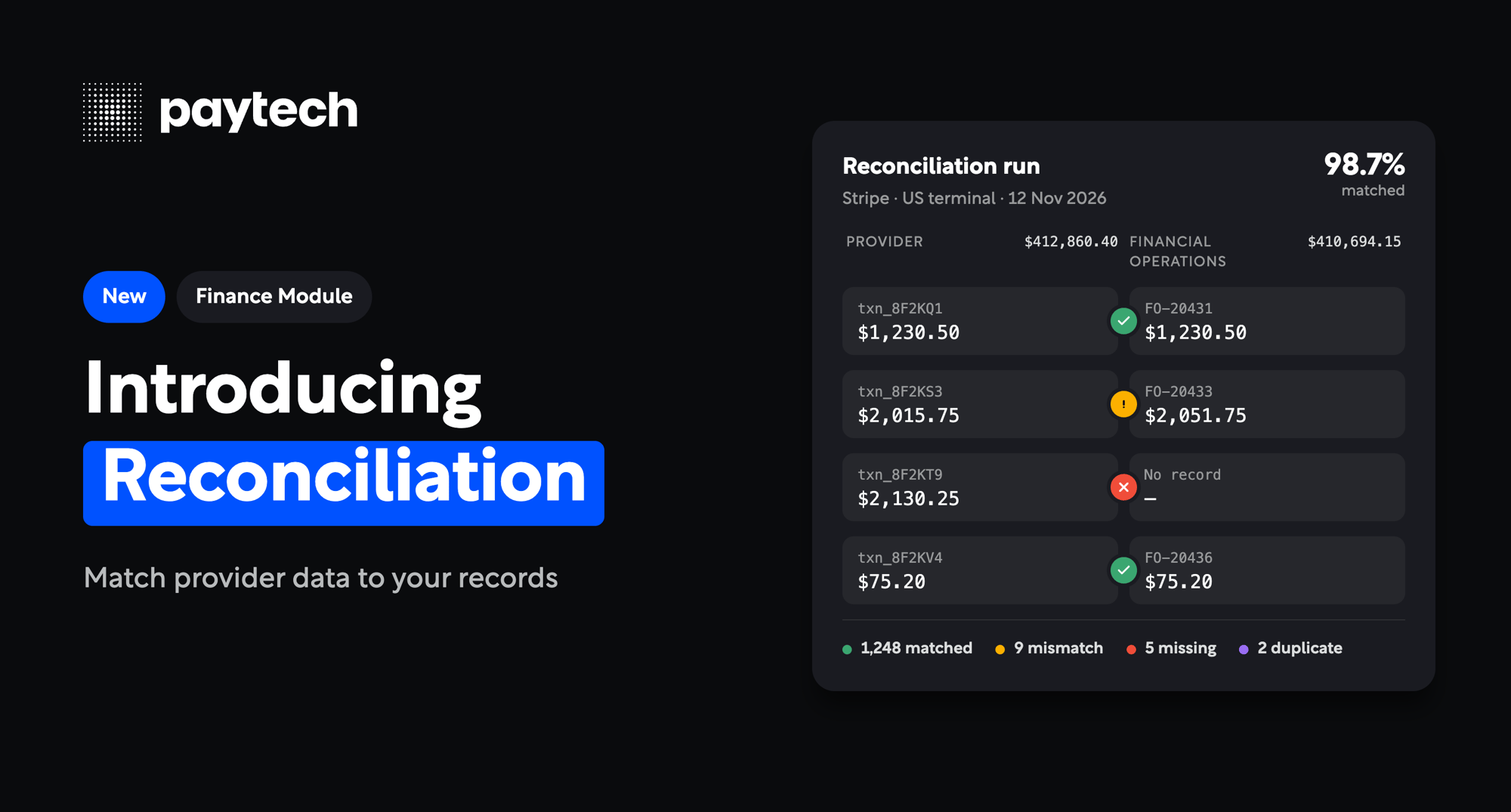
Each run shows both sides' totals, followed by the transactions that need attention.
What it flags
Every transaction in a run ends up in one of five groups, so your team can see what needs attention and why:
- Matched means that both sides have the transaction and everything agrees, so you don’t have to do anything.
- Mismatch means that both sides have the transaction, but the status, amount or currency differs. For example, the provider reports a different amount for a payment than your records show.
- Missing in Finance Operations means that the provider reports the transaction, but it isn't in your records.
- Missing in Provider means that the transaction is in your records, but the provider doesn't report it. It may have failed on the provider's side, or the provider's report may not include it yet.
- Duplicate means that the same transaction appears more than once, either in the provider’s data or in your records.
One transaction can raise more than one issue. For example, when both its amount and its status are wrong. For amount issues, the issue shows both amounts side by side, so your team sees how much money is involved before opening a file.
What your finance team gets
Reconciliation replaces side-by-side spreadsheets. With scheduled runs, the check happens every day or week and when it is paused, up to 31 days can be caught up automatically when it resumes. Differences in amount, status or currency are flagged early, so your team can deal with them before they reach a settlement.
Each discrepancy stays open until someone resolves it, one at a time or all at once. The Matched % of a run updates automatically as issues are closed, so the ledger always shows the current state for each provider and terminal.
The provider’s file is stored with the run, and each transaction is linked to its Financial Operation. Every review action is recorded with who made it and when, so there's an audit trail behind every decision.
Reconciliation is already available on request. Once it's enabled, you'll find it in the paytech Finance Module under Finance → Reconciliation.
Our job is to take the repetitive work off your finance team’s plate, so they can focus on the decisions that matter. Reconciliation is the latest step, and it won’t be the last.
paytech — powering payments